



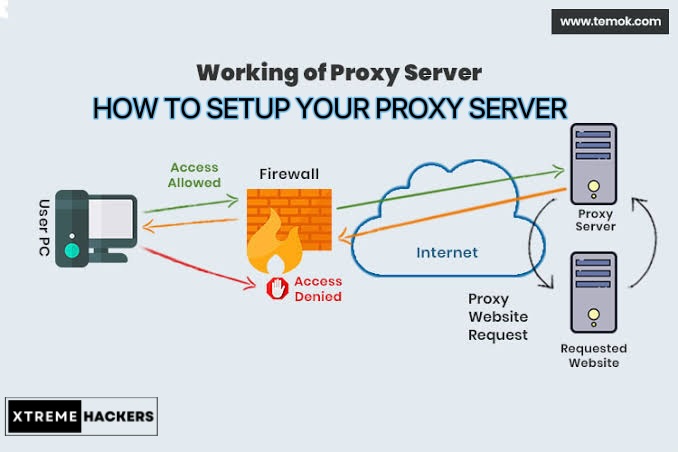
To send only your web browser traffic through a proxy for successful carding, check out Mozilla Firefox here: A Complete carding tutorial for beginners. By default, system-wide proxy settings are used, but you can configure different proxy settings specifically for Firefox.
Important Notes
Note: For these cardable sites, you don't need OTP bots if you're using a non-VBV card. Non-VBV cards bypass 2FA automatically. But don't worry—if you accidentally choose a VBV card, we've got you covered with the ultimate OTP bots tutorials to help you bypass 2FA with ease.
Normally, you would use a proxy if your job provides one, but if you want to use a proxy for carding, we recommend purchasing a residential proxy. You can also use a proxy to hide your IP address or access geo-blocked websites that are not available in your country, but we recommend using a VPN instead. If you need to set up a proxy for carding purposes, get the necessary credentials from the best proxy site.
Sponsored Ad: Get Fresh, High balance cards from our top recommended carding shop. The website is fully verified and legit Russian 🇷🇺 carding market place highly recommended for selling carded products.

The Best Cheap Residential Proxies of 2026
- Smartproxy – the best value provider.
- Oxylabs – the best premium residential proxy provider.
- Bright Data – the most features and the best proxy management tools.
- SOAX – stable residential proxies with flexible location targeting.
- NetNut – residential proxies for large-scale use.
HOW TO BUY YOUR CC FROM CARDING SHOP
Firefox is unique here because Chrome, Edge, and Internet Explorer don’t allow you to set a custom proxy server. They only use your system-wide proxy settings. With Firefox, you can route only some web traffic through the proxy without using it for every application on your system.
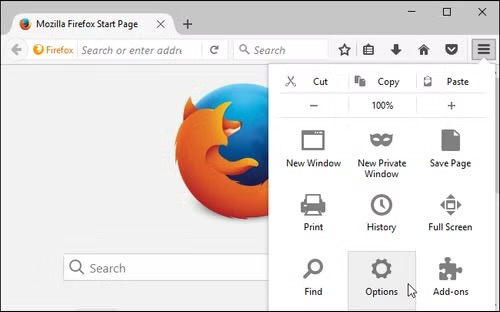
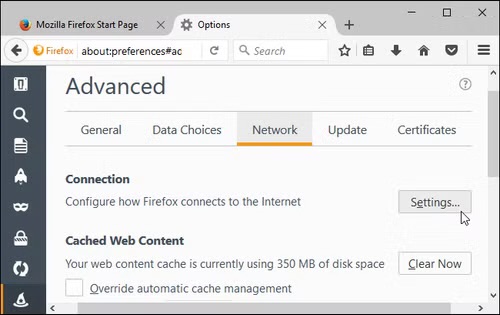
To access proxy settings in Mozilla Firefox, click on Firefox’s menu and go to Options.
Click the “Advanced” icon on the left of the Preferences window, the “Network” tab at the top of the window, and then the “Settings” button under Connection.
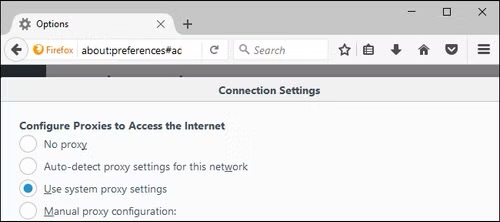
You have four choices for proxies. The default is to “Use system proxy settings”.
- No proxy: Firefox will not use a proxy server – even if one is configured in your system-wide proxy settings.
- Auto-detect proxy settings for this network: Firefox will attempt to find the proper proxy for a network using the Web Proxy Auto-Discovery Protocol, or WPAD. This method is sometimes used on business and education networks to supply a proxy for all PCs on a network with minimal configuration required.
- Use system proxy settings: Firefox uses whatever proxy setting you have set in systems settings. If you don’t have a system-wide proxy configured, Firefox won’t use a proxy.
- Configure Manually: You can, through Firefox, set custom proxy settings that it will use on its own.
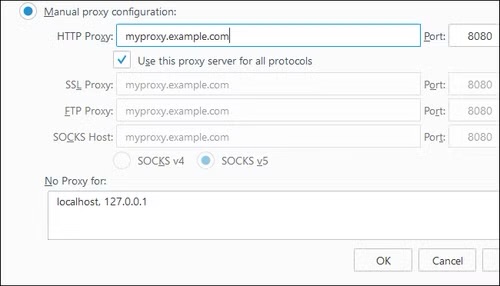
If you select manual proxy configuration, you will need to enter the proxy server settings in the fields here. Your proxy service provider (or your employer, if they provide one) can provide you with the necessary settings.
In the “HTTP Proxy” field, enter the address of the proxy server you want to use for regular, unencrypted HTTP browsing connections. You will also need to enter the port used by the proxy server in the Port field.
You will usually select the “Use proxy server for all protocols” option. Firefox also uses an HTTP proxy server for SSL-encrypted HTTPS connections and File Transfer Protocol (FTP) connections.
Uncheck this box if you want to enter separate proxy servers for HTTP, HTTPS, and FTP connections. This isn’t common.
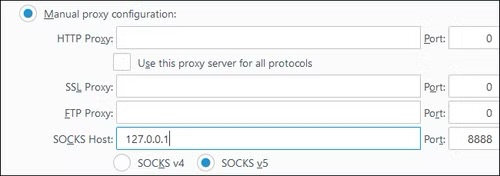
If you are configuring a SOCKS proxy, leave the boxes for HTTP Proxy, SSL Proxy, and FTP Proxy blank. First, fill in the address of your SOCKS proxy into the “SOCKS Host” and its port into the “Port” box.
When you’re hosting a SOCKS proxy on your local PC, you’ll need to enter
127.0.0.1The port that the SOCKS proxy is listening on. This is useful, for example, if you have set up an SSH tunnel with dynamic port forwarding and want to route your browser traffic through it. Firefox sends your browsing activity through a proxy server running on your local computer.

Get Cash App Transfer: Turn $250 to Six Figure Fortune
ORDER NOW
How To Hack Bank account? Order Wire Transfer Services
GET BANK TRANSFER
How To Hack ATM - Clone Card Trick For ATM Hacks
GET CLONE CARD
Shop Online Without OTP. No Carding Knowledge Required
BUY NON VBV CARD
By default, Firefox will use SOCKS v5 for the connection. If your SOCKS proxy uses the older standard, select SOCKS v4. If in doubt, leave the option at SOCKS v5.
Firefox also allows you to specify a list of addresses for which you want to bypass the proxy. Enter this in the “No proxy for” field. By default, the list here contains the following:
localhostand
127.0.0.1These addresses both point to your local PC itself. When you attempt to access a web server running on your PC, Firefox will access it directly rather than attempting to access the addresses through the proxy.
Both of these addresses point to the local PC itself – if you try to access a web server running on your PC, Firefox will contact that server directly rather than trying to access the address through a proxy.
You can add additional domain names and IP addresses to this list. To do this, simply separate each individual address in the list with a comma followed by a space. For example, if you want Firefox to be able to access xtremehackers.com directly instead of through a proxy, you would add the following:
xtremehackers.comto the end of the list like so:
localhost, 127.0.0.1, xtremehackers.com
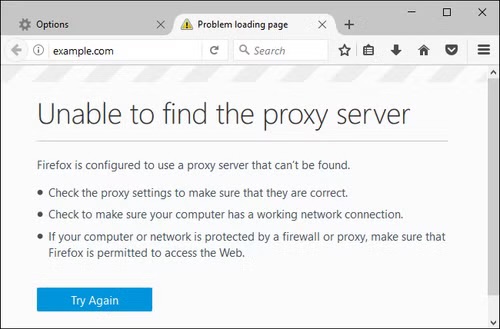
If Firefox can’t access the proxy server you’ve configured (for example, because the proxy server is down, your Internet connection is down, or you’ve entered the details incorrectly), when you try to visit a website you’ll see the error message “Proxy “server” not found.”
To browse the Internet, you’ll need to go back to Firefox’s proxy server settings and disable the proxy or fix your proxy settings.
We recommend Buying your CC from this site: Click here Or this: Click here There cards validly rate is 99.9%
SECURING CONNECTION...
Zero to $10,000: The 7 Secret Easy Cashout Glitch!

-
Instant Bank Glitch›
-
New Cash App Glitch›
-
Secure Paypal Glitch›
⚠️ URGENT: $4,200 Daily Cashout Glitch is LIVE.




Leave a comment