


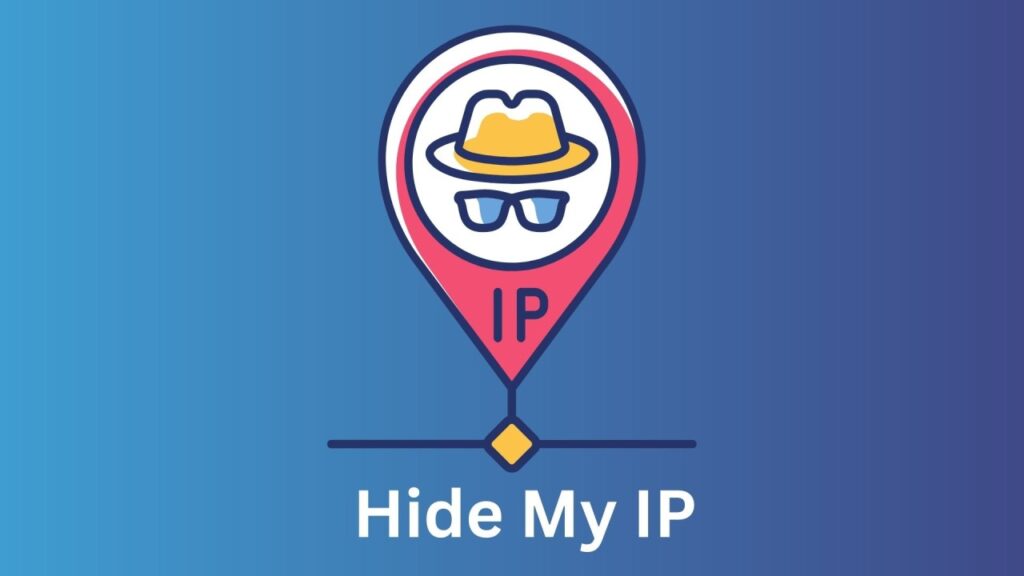
Think of your IP address as your digital home address. It is a unique ID that tells the internet exactly who you are and where you are browsing from. Every piece of tech you own, from your smartphone to your laptop, gets one so it can talk to other devices and websites.
Important Notes
Note: For these cardable sites, you don't need OTP bots if you're using a non-VBV card. Non-VBV cards bypass 2FA automatically. But don't worry—if you accidentally choose a VBV card, we've got you covered with the ultimate OTP bots tutorials to help you bypass 2FA with ease.
The catch is that this ID makes it easy for others to keep tabs on your location and what you do online.
If you want to stay private and keep your data to yourself, hiding your IP is a smart move. There are a few ways to do this, like using the Tor browser or a proxy. However, one of the most reliable and fastest methods is using a high-quality VPN, such as NordVPN. Beyond just masking your identity, a VPN helps you get around strict censorship and can even unlock a better streaming experience.
In this post, we are breaking down the simplest ways to hide your IP address so you can browse the web with total peace of mind. Let’s dive in.
READ ALSO:How to Bypass OTP Bank Card Verification Code
Quick ways to hide your IP address
You don’t need to be a tech genius to protect yourself. Here are the most effective tools:
1. Use a Stealth VPN (The Gold Standard)
A Virtual Private Network (VPN) is the easiest “set it and forget it” solution. It creates a secure tunnel for your data, replacing your real IP with one from a remote server. Services like NordVPN are popular because they offer “stealth” features that make your encrypted traffic look like regular web browsing, helping you slip past even the toughest firewalls.
2. The Tor Browser

If you want maximum anonymity, Tor is a free, open-source browser that bounces your connection through three different layers of volunteer servers. It’s a bit slower than a VPN, but it’s incredibly effective at keeping you off the radar.
3. Proxy Services
A proxy acts as a middleman. Your traffic goes to the proxy server first, which then talks to the website for you. It’s great for a quick location swap, though it usually doesn’t offer the same level of encryption as a VPN.
Is hiding your internet protocol address necessary?
Have you ever stopped to think about how websites seem to know exactly what you’re interested in? It usually starts with your IP address. Every time you visit a site or use an online service, that digital footprint is detected, which allows platforms to trail your activity almost every time you log on.
Beyond just tracking your habits, websites use your real IP address to pinpoint your location. This is exactly how companies enforce geo-restrictions. It is the reason you might lose access to your local streaming libraries when you travel abroad or notice that content changes depending on your region. Netflix is a classic example of this in action.

Privacy is also a huge factor if you ever engage in peer-to-peer activities, like using torrenting sites. Without a way to mask it, your home IP address is basically out in the open for other users and bad actors on the network to see. By using a VPN, you can keep your IP hidden from everyone else, which significantly lowers the risk of someone exploiting a vulnerability or hitting you with a DDoS attack.
Are you writing this as part of a larger guide on digital privacy, or are you focusing specifically on how to bypass streaming restrictions?

Get Cash App Transfer: Turn $250 to Six Figure Fortune
ORDER NOW
How To Hack Bank account? Order Wire Transfer Services
GET BANK TRANSFER
How To Hack ATM - Clone Card Trick For ATM Hacks
GET CLONE CARD
Shop Online Without OTP. No Carding Knowledge Required
BUY NON VBV CARD
Why do you need to mask your IP address
Keeping your location private
Your IP address shows your location and it becomes easy for hackers and snoopers to keep track of you. Therefore, it is recommended to mask your IP and stay anonymous online.
A better online experience
Your ISP knows you through your IP address from which it tracks your activities online and throttles your internet connection. Masking your IP helps you stop ISP from monitoring your digital activities and limiting your internet bandwidth.
Digital privacy
Wherever you go online without hiding your IP address, you are opening gates for hackers to get into your system and steal what’s precious to you—your online privacy. Hiding your IP address will help you maintain and enjoy maximum privacy.
Online freedom
Some websites and services often limit their access in certain regions due to censorship or copyright infringement. Changing your IP will help you bypass these restrictions.
Guide on how to hide your IP address (4 easy methods)
Protecting your IP address isn’t tricky. All it takes is to use some tool that works over your device’s network, providing it with another IP address.
In short, there are several ways to hide your device’s IP address. You can use VPN software (you must pay for this if you want a quality experience) or other free methods. Below, we list them all in detail.
1. Masking your IP address through a VPN
While this is the most reliable and easiest way to hide your actual IP address anywhere, it usually isn’t free.
You might come across some free VPNs, but they often aren’t strong enough to truly protect your online privacy. To get real reliability and speed, a quality VPN provider is almost always necessary. In most cases, this means you will need to purchase a plan for a set period of time or pay a recurring subscription fee to the service provider.
Are you looking for a recommendation on which paid VPN offers the best value for your specific needs?
A Virtual Private Network (VPN) provides you with a virtual IP address, making it easy to access websites that might otherwise be restricted.
The way it works is fairly straightforward: VPN servers assign a unique IP from their own network to your computer. This acts as an alternate identity, and your device uses this new IP to connect to the internet securely. This process effectively keeps your actual home IP address hidden from the rest of the web.
Top-tier providers like NordVPN maintain servers in locations all over the world. Depending on your plan, you can get an IP address assigned from almost anywhere. One of the biggest perks of using a vetted service like this is the connection speed. While you can find plenty of cheap or even free VPNs, they often slow your connection down to the point of frustration. As the saying goes, “free” usually comes with a hidden cost.
With a genuine, paid connection, you generally don’t run into those performance issues. It’s important to avoid “fake” or low-quality services that offer far less than they promise, which is why picking the right provider is so essential.
Beyond just speed, quality VPNs are great for anyone using torrent sites. Some services even offer dedicated P2P servers specifically for torrenting. While these features can make a VPN a bit more expensive, they provide an extra layer of utility. If you want to hide your IP safely while enjoying premium features, a solid service like NordVPN is built for that. They use advanced encryption and modern security protocols to ensure your original IP address never leaks.
Of course, if you aren’t ready to spend money on a subscription right now, there are other free ways to mask your IP. We will go over those options in detail below.
Are you planning to include a comparison table for these free options, or should we keep the focus on a step-by-step guide for each one?
Pros
- Encrypts the traffic between your device and the VPN server. This protects your data and privacy online
- Don’t retain your personally identifiable information. Thus, they can hand your browsing data to government authorities or third parties
- It helps you evade geo-restrictions. You can access blocked content in whichever region worldwide
- Public Wi-Fi protection. A VPN will safeguard your connection when using a public Wi-Fi hotspot
Cons
- It May slow down your speed due to the encryption process
A quick guide to hiding IP address via a VPN
While you can use several means to mask your IP, you might be in a rush to read them all. So, here we quickly explain the most effective way – using a VPN.
- Subscribe to a robust VPN service provider. Ideally, choose a top-notch premium VPN service to get the best security features. PUREVPN is our no. 1 recommendation.
- Download the VPN client for your device. You can also use the VPN’s browser extension for added privacy (if available).
- Install the app. Usually, it takes only a few clicks to set up the VPN.
- Connect to a VPN server. You can browse the list of servers available and choose the one from your desired with the best speeds.
- Start browsing safely. As a precaution, consider clearing your device or browser cache after connecting the VPN so that it can better hide your real IP address.
2. Hiding your IP address through Tor Network
You can stay undetected while surfing the internet using a free IP hiding tool — the Tor network.
The Tor network uses a free client-based system involving various volunteer servers.

When you connect via the Tor network, your computer’s traffic passes through several servers before reaching its destination. That’s how it becomes complicated to track where the traffic comes from. So, it leaves your IP untraceable online.
Tor offers multiple layers of protection to ensure your computer’s IP address is entirely off the radar.
However, it has the same problem as a proxy server or free browser extension.
Your connection speed gets slow since your computer’s traffic passes through several servers before reaching the destination.
However, the good thing is this method of hiding IP addresses is completely free.
You are not paying a single cent to surf online securely, download videos, or browse web pages you like. So yes, your IP address will remain hidden for free when you’re doing all that.
Pros
- An effective way to hide your IP address. This will help you to bypass geo-restrictions and access websites outside your region
- An excellent option for low-risk tasks like bypassing content filters
- Due to their ability to cache data, they can produce data faster
Cons
- Due to a lack of encryption, the data can be exposed
- The servers do not also delete digital footprints, so others see your online activities
- Most free servers display lots of ads, which can be annoying
3. Browsing through proxy servers
Like the VPN and Tor, a proxy server lets you hide your IP address to access geographically blocked content.
It’s a handy means, especially when you want to access a website that does not accept your actual location. Also, it’s simple to use and often free.
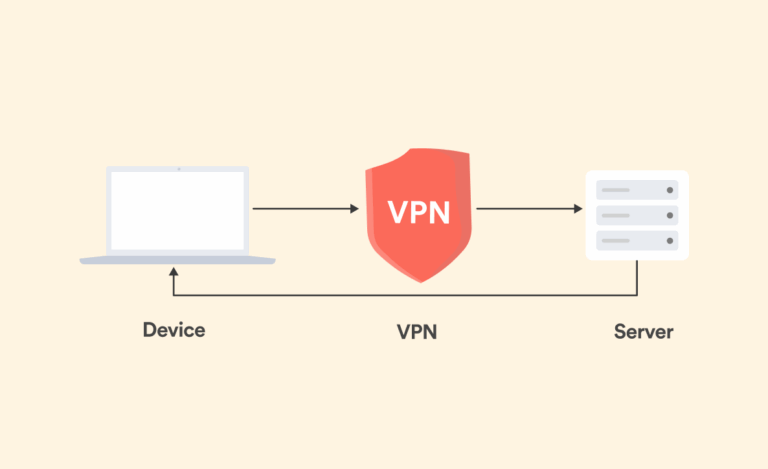
Ever wonder how a proxy actually works?
Imagine you are in London and want to catch a live match that is only streaming for people in the US. If you use a proxy, your computer sends a request to a server located in the States to view the video. That US proxy server intercepts your request and passes it along using a US-based IP address. Once the server gets the video data, it sends it back to your computer in London.
In simple terms, a proxy acts as a middleman between your device and the rest of the web.
While that sounds useful, there is a major downside: speed. Because your data has to make an extra stop between your computer and the host, things can get incredibly slow. Without a proxy, you have a direct two-way connection. With a proxy, it becomes a three-way trip, which is why free proxy sites often feel sluggish.
Security is another big concern. If you are worried about sensitive information, you should be very careful with proxy servers. Unlike a VPN, a proxy doesn’t usually encrypt your data. It simply forwards whatever it receives, meaning your personal info isn’t tucked away behind a layer of security.
Using a proxy for torrenting is also generally a bad move. It won’t hide your activity from your Internet Service Provider (ISP), which defeats the purpose for many. When you weigh these risks against the benefits, a free proxy often ends up being a pretty poor alternative to a more secure setup.
Are you planning to follow this up with a section on the Tor browser, or is this the final “free” method you wanted to cover?
Pros
- It is free and easy to configure and use
- Works well with all major operating systems
- Efficiently hides IP address making it impossible to trace
- Provides access to .onion sites (dark web)
- It is open-source, so anyone can inspect the code, which reduces the chances of malicious backdoors
Cons
- It can slow the internet speed due to the rerouting of your traffic
- As much as Tor can help in effectively hiding IP addresses, it can still lead you to trouble with the government as it provides access to the dark web. However, you will still be fine as long as you don’t do anything illegal
- Tor does not provide end-to-end encryptions. So, anyone with access can read any message sent in plain text, like passwords and usernames
- It may restrict your access to sites that require your location, like Facebook, Linkedin, Gmail, etc.
- Many websites don’t work well on Tor because it disables JavaScript and other technologies for running these sites smoothly
4. Using public WiFi
We hope you would have chosen your best option by now. But if you haven’t, here’s the last workaround to hide your actual IP address: using a public WiFi network.
While it’s viable and often free, we don’t advise you for that.
Public servers are not meant to protect the IP address. Instead, they are offered where it isn’t easy to get internet service in a particular location.
Generally, your Internet Service provider (ISP) assigns an IP address to your system. However, when using another ISP, the IP address automatically reflects one from the new ISP.
It is an excellent option to hide your activities from other internet servers and users. But the problem with this method is the high level of security risk involved.
If you’re using Public WiFi, your computer would be vulnerable to malware, hackers, and other internet security threats.
Also, this method will not prevent geographical blocks since you’re connecting from the exact location.
It’s only valid if you want to use a different IP address other than yours to access a website’s content.
Notably, faking your IP through public WiFi is not a permanent solution. Instead, it’s more of a quick fix.
Which method of hiding my IP address should I pick?
The answer to this question depends on your browsing requirements and budget limitations.
A VPN is the best option for getting a fake IP address and online location. Besides anonymity, it also provides you with complete online privacy and security.
However, if you can’t risk your money to get a dedicated VPN server and can bear slow connection speeds, Tor might be the best option to hide your IP address.
In contrast, a proxy will slow your connections, even when you pay. (Yes, there are paid proxies, too).
Proxy is not recommended for everyday use; you can use it in extreme need. But make sure you don’t waste money on paid proxies; go only with free ones, as paying, in this case, won’t make much difference.
So, using a reputable VPN is the most effective and surest way to hide your IP address without compromising speeds. But if you cannot afford the cost, you can always use a free service like the Tor network.
What is my device IP?
Generally, your device holds two types of IP addresses depending on how it communicates online and offline. These include a private IP and a public IP.
A private IP address is unique to a device within the network. This private IP serves as the basis for offline communications and remains private. Despite being unique within a network, it may repeat for another device in another network. However, that won’t be a problem since the two networks seldom communicate.
But if the networks ever communicate, it is almost always via the Internet. So that’s where the second type of IP address plays its role – the public IP address.
Public IP addresses are unique for every device online. These IP addresses let the devices and the web servers communicate with each other over the internet. While they are unique, they may be shared by different devices within the same private network for online communication.
The private IP address for your device is the one that your router has assigned to it. You can log in to your router’s admin panel and find the private IP addresses of all connected devices (including your computers, smartphones, and others). You will notice that this IP address is unique for every device.
In contrast, you can search for “what is my IP” on Google or any other search engine to check your public IP address. Or, you can use this IP checker tool to find your public IP address. This IP address is the one that your ISP has assigned to your network. And so all devices connected to your network (set up by your router) will share the same public IP address.
Since your private IP remains invisible online, you don’t have to worry about securing it. Instead, the IP address you must hide is the public IP, which automatically protects your network.
How to check your IP Address online
So now you know how to hide your IP address. But how would you determine if it is working?
Technically, you must verify that you have successfully hidden your public IP address before proceeding with your intended activity. You must check your IP address first to ensure you don’t make mistakes that would blow your cover.
The simplest way to verify the successful masking of your IP is to use this IP checker tool. It should show a location and an IP address different from yours. Ideally, it will be the one that your VPN or proxy has provided you with.
Alternatively, you can follow these steps to ensure you have hidden your online IP location.
Step 1: If you are using a VPN, proxy server, or connected to the Tor Network, disconnect it and go over to a search engine, such as Google.
Step 2: Type the words “My IP” and press enter.

If you have not successfully hidden your IP address, Google will bring out your computer’s IP address like this:
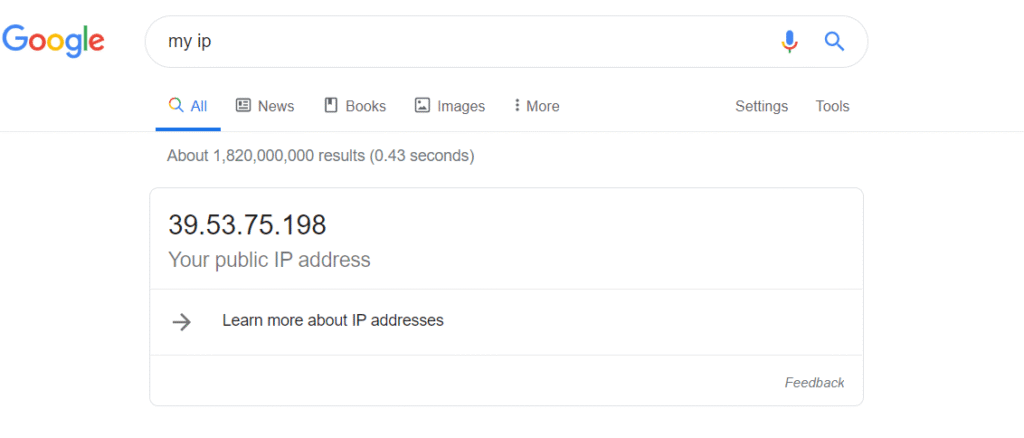
Step 3: You now know your actual public IP address. Return to the VPN, Tor, or proxy network, clear your device or browser cache, and repeat step 2.
Now, you won’t see your actual IP address location but the assigned proxy IP passed by your computer. If you can verify a change, you can start browsing with privacy.
What are the benefits of hiding my IP address?
Most people love hiding their IP addresses to get easy access to download illegal (or forbidden) materials.
But that’s not right. Nor did we set up this guide to facilitate such wrongdoers.
Nonetheless, there are several other benefits of hiding your IP address – the legal ones.
1. Bypass content restrictions
Sometimes you might be genuinely looking for important information, and the website will come up with the usually annoying reply,
Oops, sorry this information is restricted from your IP address.
That means the site blocks IP addresses from specific geographical locations.
Sometimes, private firms restrict access to their content from specific IP addresses to curb copyright infringements.
Likewise, governments in different countries might also block specific sites from showing content to internet users in the region. Often, it’s due to political reasons, like in the Middle East and China.
But if you hide your IP address, you can access that information like your actual IP address becomes anonymous, and the device shows a fake one to the portal you visit.
2. Protect your personal data online
Another reason to hide your IP is to avoid misusing your personal information as you browse privately online.
Yes, everybody loves the freedom of browsing without any server spying on them for personal information.
Most servers do this to get precise information to send personalized ads to your IP address. Some even sell your data to advertisers. The servers can also track your location, even when you turn off location services.
But if you hide your IP address, you may surf the net without worries.
Methods that never work to hide your IP address (and so, you should avoid)
Surprisingly, the following techniques are popular among users for maintaining privacy. However, you should be clear that these methods never hide your IP address, nor do they anonymize you online. So, if you intend to hide your real IP, avoid using or relying on them.
1. Private browsing via a web browser (Incognito)
The look and feel of incognito mode in most browsers give the impression that they make you anonymous online. However, that’s not true.
Private or incognito browsing mode never hides your IP address. Nor does it protect your data from your ISP. Instead, it only prevents your browser from storing your browsing history on your device.
2. Using NAT Firewall
A NAT Firewall is typically meant to provide unique private IP addresses to the devices connected to a single router. That’s how it helps multiple devices operate uniquely with the same public IP address. However, it doesn’t hide, modify, or mask your public IP.
3. Asking your ISP for a new IP address
As evident, getting a new IP address from your ISP assigns a new IP to your device altogether. This new IP is now visible online, similar to your previous one. While you can use this technique to evade IP bans, you can’t use it to hide your IP online.
Can my IP address be hidden 100%?
As a rule of thumb, no technology is ever 100% foolproof. The same applies to the methods to hide your IP address online.
But that doesn’t mean that you should abandon this idea altogether.
Basically, proxies, VPNs, and other strategies are aimed at providing you – the user – online privacy and greater anonymity. These tools strive to protect you from cybercriminals and surveillance and web-tracking entities.
However, many other features on your devices also somehow leak your IP address. These include potential exposures via DNS, WebRTC, and more. But if you use robust tools like a premium VPN, you can effectively prevent such IP leaks.
Indeed, you don’t need to become entirely anonymous like a criminal. What you need (and deserve) is protection against potential intruders.
You can effectively achieve this goal by using a VPN. It will typically mask your IP address, DNS, and almost all other ways intrusive web trackers may reach your device.
However, the onus of this online privacy comes to you, the user. That’s because the ultimate choice of the tool to protect your IP address is yours.
With web proxies, you might not expect better anonymity. That’s because most proxies often fail at adequately encrypting your data. Thus, they keep you vulnerable to interception by ISPs and other entities. Likewise, you might face problems accessing restricted content (such as streaming services), as the corresponding platforms could still detect you.
So, you should always use a reliable VPN to hide your IP and keep all snoopers at bay. Even if not 100%, you can still attain a far greater level of online privacy and anonymity this way.
Does using a VPN hide my IP address from my ISP?
It is important to remember that your ISP is the one providing your IP address in the first place. Because of that, you can’t actually hide your IP from the provider itself, and a VPN isn’t really designed to do that anyway.
What a VPN actually does is protect your internet traffic from your ISP by using encryption. This means that while your ISP can see that you are connected to the internet, they can’t actually track what you are doing or see the specific sites you are visiting.
On the flip side, a VPN masks your real IP address with a virtual one for the rest of the online world. So, while the websites you visit can see that someone is interacting with them, they only see the VPN’s IP address rather than your real one. This makes it much harder for anyone to trace your online footprint back to your actual location or identity.
Since we have covered VPNs, proxies, and ISPs, would you like me to help you write a concluding section that summarizes which of these methods is best for different types of users?
SECURING CONNECTION...
Zero to $10,000: The 7 Secret Easy Cashout Glitch!

-
Instant Bank Glitch›
-
New Cash App Glitch›
-
Secure Paypal Glitch›
⚠️ URGENT: $4,200 Daily Cashout Glitch is LIVE.





Leave a comment