






Are you concerned with your online privacy? The 2026 internet is a gigantic indexing engine. AI algorithms are constantly crawling your digital footprint to create “shadow profiles” of your personal life. And if it feels like your phone is reading your mind, you aren’t paranoid—you’re just being indexed. Have you ever wondered how hackers get access to millions of personal pieces of information like credit card information, IDs, SSNs, passports, TINs, NINs, bank accounts, tax records, PHI, biometric data, and login credentials?
Important
Notes
To take back your digital territory, think beyond the easy stuff like “change my password.” Here’s a foolproof, human-guided approach to remaining off the AI radar.
1. Ditch Passwords for Passkeys
Passwords are the “weakest link” of 2026. Hackers now have AI at their disposal to try billions of combinations in seconds. Upgrade to passkeys, which use public-key cryptography saved on your device. Because websites never actually see your credentials, just a cryptographic proof of them, they remain almost unphishable.
2. Cloak Your Identity with Email Aliases
Stop signing up for every newsletter and shop with your real email. You can use services such as Apple’s “Hide My Email” or SimpleLogin to generate unique, disposable addresses that forward to your inbox. If a company leaks your data, you can just “kill” that alias without sacrificing your main account.
Read Also: How to Hide Your IP Address in 2026: The Complete Guide to Online Privacy
3. Opt-Out of AI Training Globally
The majority of big tech platforms now operate under the assumption of “silent consent” to train models on your posts and photos. Go to your settings for Meta, LinkedIn, and Google, find the toggle for “Data Use for AI Training,” and turn it off. Your personal data is a commodity in 2026; stop giving it away for free.
4. Enable Global Privacy Control (GPC)
GPC is a “Do Not Track” signal that actually works. This legal signal is now supported by most modern browsers. When you turn it on, your browser informs each site that you visit that you have a legal right not to sell or share your data.
5. Audit Your “Shadow” App Permissions
I get requests for permissions the app does not need, like Background Location or Microphone Access. These are goldmines for AI data brokers. Set permissions to “Only While Using the App,” or delete any app you haven’t opened in three months to reduce what I call your attack surface.
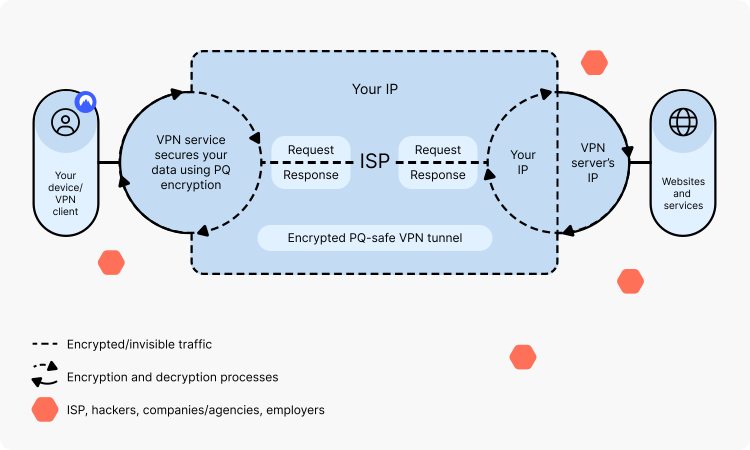
6. Use a VPN with “Post-Quantum” Encryption
Advanced computing is already starting to crack standard encryption. Make sure your VPN provider has transitioned to Post-Quantum Encryption (PQE). This prevents even the data you are intercepting today from being decrypted by future AI attacks.
7. Scrub Your Metadata Before Posting
Every single photo you post has “EXIF data” associated with it—including precise GPS location, time and date, and device. Use a “Metadata Remover” app to strip this hidden tracking info, or take a screenshot of your photo and post the shot instead of the original file.
8. Feed “Noise” to Trackers
AI thrives on predictable patterns. One such tool, AdNauseam, works by clicking ads behind the scenes, effectively “poisoning” the data profile that advertisers and AI models attempt to compile. Without being able to know what you really like, they cannot help target you.
9. Move Beyond SMS Two-Factor Authentication
SMS codes can be intercepted easily through “SIM swapping.” Enable Authenticator Apps or Hardware Security Keys (e.g., YubiKey). These have to be performed in person on a device, so it’s not something an AI bot can hijack your login for.
10. Practice “Data Minimization.”
The best way to safeguard data is simply not to give it. If a form requests your birth date or phone number, and it is not required by law, skip that field. Treat your personal info like it’s currency—only spend it when you really have to.
SECURING CONNECTION...
Zero to $10,000: The 7 Secret Easy Cashout Glitch!

-
Instant Bank Glitch›
-
New Cash App Glitch›
-
Secure Paypal Glitch›
⚠️ URGENT: $4,200 Daily Cashout Glitch is LIVE.






Leave a comment